Consumer Group Management
This page describes how Korvet handles Kafka consumer group operations.
| This page is implementation-oriented and focuses on Kafka-to-Redis mapping details. |
Join Consumer Group (Implicit Group Creation)
Kafka Wire Protocol
JoinGroupRequest {
  group_id: "my-group"
  session_timeout_ms: 45000
  rebalance_timeout_ms: 300000
  member_id: ""                    // empty for first join
  group_instance_id: null
  protocol_type: "consumer"
  protocols: [
    {
      name: "range"                // partition assignment strategy
      metadata: {
        version: 1
        topics: ["orders"]
        user_data: null
      }
    }
  ]
}
JoinGroupResponse {
throttle_time_ms: 0
error_code: 0
generation_id: 1
protocol_name: "range"
leader: "consumer-1-uuid" // first member becomes leader
member_id: "consumer-1-uuid" // assigned by broker
members: [
{
member_id: "consumer-1-uuid"
group_instance_id: null
metadata: {
version: 1
topics: ["orders"]
user_data: null
}
}
]
}
Redis Commands Detail
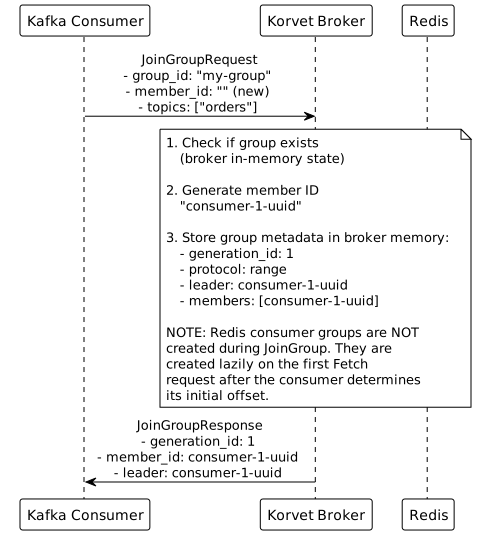
JoinGroup is handled by the broker-side group coordinator and consumer-group registry. Redis stream consumer groups are not created during JoinGroup.
Implementation Notes
-
Implicit Creation: Consumer groups are created automatically on first
JoinGrouprequest -
Initial Position: Redis consumer groups are created lazily on the first
Fetchrequest (notJoinGrouporSyncGroup)-
The client determines the initial offset based on:
-
OffsetFetchRequestresult (if group has committed offsets) -
auto.offset.resetconfiguration (if no committed offset exists) -
ListOffsetsAPI (to resolve "earliest" or "latest" to actual offset)
-
-
The client sends this offset in the
fetch_offsetfield of the firstFetchRequest -
The broker creates the Redis consumer group using this offset:
-
XGROUP CREATE
-
-
The broker tracks which groups have been initialized in memory
-
See Consumer Group Workflow and Consumer Group Initialization for complete details
-
-
Member ID Assignment:
-
Generate UUID for new members (empty
member_idin request) -
Reuse existing
member_idfor rejoining members
-
-
Generation ID:
-
Increments on each rebalance
-
Stored in group metadata
-
Used to detect stale member operations
-
-
Leader Election:
-
First member to join becomes leader
-
Leader performs partition assignment
-
Stored in group metadata
-
-
Protocol Selection:
-
Broker selects protocol supported by all members
-
Common protocols: range, roundrobin, sticky
-
-
Rebalance:
-
Triggered when members join/leave
-
All members must rejoin and get new partition assignments
-
-
Heartbeat: Members send periodic heartbeats to maintain membership (separate HeartbeatRequest)
-
Session Timeout: Member removed if no heartbeat within
session_timeout_ms
Delete Consumer Group
Kafka Wire Protocol
DeleteGroupsRequest {
  groups_names: ["my-group", "old-group"]
}
DeleteGroupsResponse {
throttle_time_ms: 0
results: [
{
group_id: "my-group"
error_code: 0 // NONE
},
{
group_id: "old-group"
error_code: 69 // GROUP_ID_NOT_FOUND
}
]
}
Redis Commands Detail
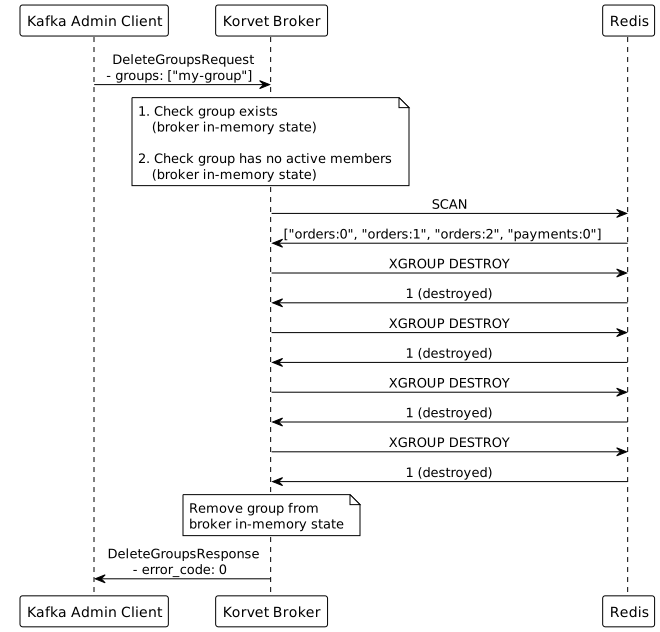
DeleteGroups removes broker-side group state, asks the storage layer to delete group artifacts for known stream keys, and deletes explicit committed offsets for those stream keys.
Implementation Notes
-
Group Doesn’t Exist: Return
GROUP_ID_NOT_FOUND(error code 69) -
Active Members:
-
Cannot delete group with active members
-
Return
NON_EMPTY_GROUP(error code 68) -
Check broker in-memory state for active members
-
-
Storage Cleanup:
-
Group deletion delegates per-stream cleanup to the storage layer
-
Explicit committed offsets are also deleted from the committed-offset store
-
-
Cascading Effects:
-
Active consumers will get errors on next operation
-
Consumers should handle
UNKNOWN_MEMBER_IDand rejoin
-
-
Performance: The handler builds a stream-key list from known topics and partitions, then performs storage cleanup asynchronously
Consumer Group Offsets (Admin API)
GET /api/v1/consumer-groups/{groupId}/offsets is a read-only HTTP Admin API
operation for control-plane views that need current per-partition offset and lag
snapshots. Optional topic and partition query parameters narrow the response.
The response is wrapped as { "items": […], "total": n }. Each row includes
the group ID, topic, partition, explicit committed offset when present, resolved
current offset, end offset, lag, last delivered stream ID, pending count, nullable
last observed commit timestamp, and nullable assigned member/client IDs.
Snapshot Detail
The endpoint derives the snapshot from existing broker and storage state only:
-
Enumerate topic partitions from the current topic registry and apply filters.
-
Read explicit committed offsets and their commit timestamps from the committed-offset store.
-
Read storage-backed Redis consumer group metadata for last delivered ID, pending count, and fallback cursor state.
-
Read stream metadata to calculate current end offsets.
-
Read active group assignments from the in-memory group coordinator when available.
Rows are returned for partitions that have group-relevant state: an explicit committed offset, storage-backed group metadata, or an active assignment.
Implementation Notes
-
Unknown Group: The Admin API returns
404when the group is absent from active coordinator state, durable committed-offset group IDs, and the requested storage-backed group metadata snapshot. -
Current Offset: The explicit committed offset is authoritative. When no explicit commit exists but storage group metadata has delivered messages, the current offset falls back to the mapped
last-delivered-id, mirroringOffsetFetchfallback behavior. -
Lag: Lag is a count of messages not yet delivered to the storage-backed consumer group, sourced from Redis group metadata (
XINFO GROUPSlag) when available. It is not derived from Korvet’s sparse encoded offset distance. Delivered-but-uncommitted pending messages are excluded; usependingCountto inspect in-flight work. If storage cannot report message lag, the field remainsnull. -
Nullable Fields:
lastCommitTimestampis the latest commit observed by a timestamp-aware broker. It isnullfor offsets written before timestamps were recorded, untimestamped writes through the current store, unavailable metadata, and rows without an explicit commit. An older broker participating in a rolling upgrade cannot advance or invalidate this field; it remains the latest observation made by a timestamp-aware broker until a current broker writes or clears it. Assignment, pending count, last delivered ID, end offset, and lag are nullable when the backing state does not currently expose them. -
Scope: This endpoint does not add lag history, alerting, reset previews, reset application, audit events, or broker behavior.
Reset Consumer Group Offsets (Admin API)
POST /api/v1/consumer-groups/{groupId}/reset-offsets is an HTTP Admin API
operation for the control-plane UI. It is not a Kafka wire-protocol request.
Cleanup Detail
Offset reset is group-wide and uses the current topic registry to resolve the stream keys for all known topic partitions.
The broker performs cleanup in this order:
-
Delete storage-backed Redis consumer group state for the stream-key snapshot.
-
Delete explicit committed offsets from the committed-offset store for the same streams.
-
Clear in-memory delivery tracking after storage cleanup succeeds, even when committed-offset deletion later reports an error.
Deleting storage-backed group state first keeps explicit committed offsets authoritative if the reset fails partway through. In-memory delivery tracking follows storage-backed group state so active fetches can recreate Redis groups after storage cleanup succeeds.
Implementation Notes
-
Unknown Group: The Admin API returns
404when the group is absent from active coordinator state and durable committed-offset group IDs. -
Empty Durable Groups: Groups known only from durable committed offsets are returned by
GET /api/v1/consumer-groupsandGET /api/v1/consumer-groups/{groupId}withEMPTYstate and no members. -
Fallback Offsets: Clearing storage-backed group state matters because
OffsetFetchcan fall back to Redis grouplast-delivered-idwhen no explicit committed offset exists. -
Scope: Resetting offsets does not delete the broker’s coordinator metadata for an active group; it only clears offset-related state.
-
Active-group race: Reset is clear-only and does not pause delivery. An actively fetching consumer can recreate the Redis group immediately after the clear, so callers should expect a reset to be eventually consistent for groups with live members.
-
Authorization and audit: This operation performs no authorization check and emits no audit event. Both are intentionally out of scope for this slice and must be added before the endpoint is exposed to untrusted callers.

