|
For the latest stable version, please use Korvet 0.12.5! |
Consumer Group Management
This page describes how Korvet handles Kafka consumer group operations.
Join Consumer Group (Implicit Group Creation)
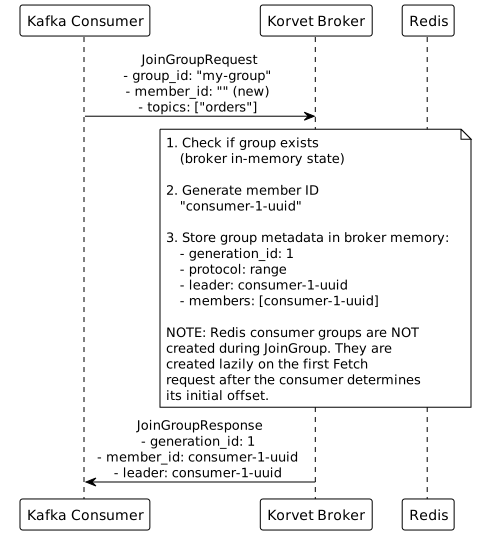
Kafka Wire Protocol
JoinGroupRequest {
  group_id: "my-group"
  session_timeout_ms: 45000
  rebalance_timeout_ms: 300000
  member_id: ""                    // empty for first join
  group_instance_id: null
  protocol_type: "consumer"
  protocols: [
    {
      name: "range"                // partition assignment strategy
      metadata: {
        version: 1
        topics: ["orders"]
        user_data: null
      }
    }
  ]
}
JoinGroupResponse {
throttle_time_ms: 0
error_code: 0
generation_id: 1
protocol_name: "range"
leader: "consumer-1-uuid" // first member becomes leader
member_id: "consumer-1-uuid" // assigned by broker
members: [
{
member_id: "consumer-1-uuid"
group_instance_id: null
metadata: {
version: 1
topics: ["orders"]
user_data: null
}
}
]
}
Redis Commands Detail
# 1. Check if group already exists (broker in-memory state)
# No Redis command needed

# 2. Get partition count for subscribed topic (broker in-memory metadata)
# No Redis command needed - broker knows topic has 3 partitions

# 3. Group metadata (generation_id, protocol, leader, members) is stored
# in broker in-memory state, not Redis

# NOTE: Redis consumer groups are NOT created during JoinGroup!
# They are created lazily on the first Fetch request, after the consumer has:
# - Received partition assignments (SyncGroup)
# - Fetched committed offsets (OffsetFetchRequest)
# - Determined the initial offset to start from (client-side logic)
# - Sent the first FetchRequest with the initial offset
#
# See Consumer Group Workflow for complete sequence
Implementation Notes
-
Implicit Creation: Consumer groups are created automatically on first
JoinGrouprequest -
Initial Position: Redis consumer groups are created lazily on the first
Fetchrequest (notJoinGrouporSyncGroup)-
The client determines the initial offset based on:
-
OffsetFetchRequestresult (if group has committed offsets) -
auto.offset.resetconfiguration (if no committed offset exists) -
ListOffsetsAPI (to resolve "earliest" or "latest" to actual offset)
-
-
The client sends this offset in the
fetch_offsetfield of the firstFetchRequest -
The broker creates the Redis consumer group using this offset:
-
XGROUP CREATE
-
-
The broker tracks which groups have been initialized in memory
-
See Consumer Group Workflow and Consumer Group Initialization for complete details
-
-
Member ID Assignment:
-
Generate UUID for new members (empty
member_idin request) -
Reuse existing
member_idfor rejoining members
-
-
Generation ID:
-
Increments on each rebalance
-
Stored in group metadata
-
Used to detect stale member operations
-
-
Leader Election:
-
First member to join becomes leader
-
Leader performs partition assignment
-
Stored in group metadata
-
-
Protocol Selection:
-
Broker selects protocol supported by all members
-
Common protocols: range, roundrobin, sticky
-
-
Rebalance:
-
Triggered when members join/leave
-
All members must rejoin and get new partition assignments
-
-
Heartbeat: Members send periodic heartbeats to maintain membership (separate HeartbeatRequest)
-
Session Timeout: Member removed if no heartbeat within
session_timeout_ms
Delete Consumer Group
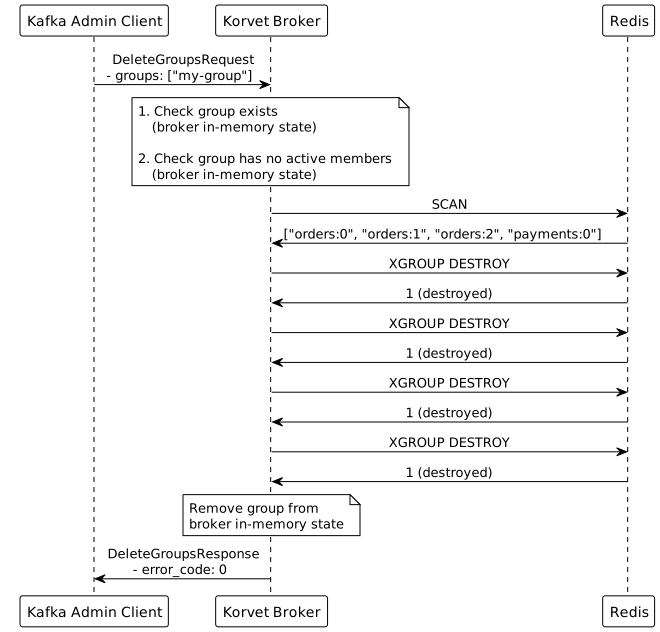
Kafka Wire Protocol
DeleteGroupsRequest {
  groups_names: ["my-group", "old-group"]
}
DeleteGroupsResponse {
throttle_time_ms: 0
results: [
{
group_id: "my-group"
error_code: 0 // NONE
},
{
group_id: "old-group"
error_code: 69 // GROUP_ID_NOT_FOUND
}
]
}
Redis Commands Detail
# 1. Verify group exists (broker in-memory state)
# If not exists: return GROUP_ID_NOT_FOUND (error code 69)

# 2. Check if group has active members (broker in-memory state)
# If has members: return NON_EMPTY_GROUP (error code 68)

# 3. Discover all partition streams using SCAN
SCAN 0 MATCH *:* TYPE stream
# Returns: ["orders:0", "orders:1", "orders:2", "payments:0"]

# 4. Destroy consumer group for each partition stream
XGROUP DESTROY orders:0 my-group
XGROUP DESTROY orders:1 my-group
XGROUP DESTROY orders:2 my-group
XGROUP DESTROY payments:0 my-group
# Returns: 1 (destroyed) or error if group doesn't exist on that stream

# Note: XGROUP DESTROY may fail if group doesn't exist for a partition
# This is OK - group may not have consumed from all topics

# 5. Remove group from broker in-memory state
# No Redis commands needed
Implementation Notes
-
Group Doesn’t Exist: Return
GROUP_ID_NOT_FOUND(error code 69) -
Active Members:
-
Cannot delete group with active members
-
Return
NON_EMPTY_GROUP(error code 68) -
Check broker in-memory state for active members
-
-
Partial Subscriptions:
-
Group may not have consumer groups on all topic partitions
-
XGROUP DESTROYwill fail for partitions where group doesn’t exist -
Ignore these errors
-
-
Cleanup All Data:
-
Destroy Redis consumer groups (XGROUP DESTROY) for all partitions
-
Remove group from broker in-memory state
-
Committed offsets are tracked by Redis Streams consumer groups (removed with XGROUP DESTROY)
-
-
Cascading Effects:
-
Active consumers will get errors on next operation
-
Consumers should handle
UNKNOWN_MEMBER_IDand rejoin
-
-
Performance: For groups subscribed to many topics:
-
May need to destroy consumer groups on hundreds of partitions
-
Use pipelining for XGROUP DESTROY commands
-

