Topic Management
This page describes how Korvet handles Kafka topic management operations.
| This page is implementation-oriented and focuses on Kafka-to-Redis mapping details. |
Create Topic
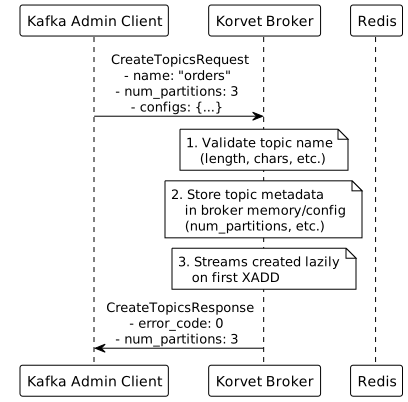
Kafka Wire Protocol
CreateTopicsRequest {
  topics: [
    {
      name: "orders"
      num_partitions: 3
      replication_factor: 1      // ignored in single-node setup
      assignments: []            // empty = auto-assign
      configs: [
        {name: "retention.ms", value: "86400000"},        // 1 day
        {name: "retention.bytes", value: "1073741824"},   // 1 GB
        {name: "compression.type", value: "lz4"}
      ]
    }
  ]
  timeout_ms: 60000
  validate_only: false         // true = validate but don't create
}
CreateTopicsResponse {
throttle_time_ms: 0
topics: [
{
name: "orders"
error_code: 0 // NONE
error_message: null
num_partitions: 3
replication_factor: 1
configs: [
{name: "retention.ms", value: "86400000", read_only: false, is_default: false},
{name: "retention.bytes", value: "1073741824", read_only: false, is_default: false},
{name: "compression.type", value: "lz4", read_only: false, is_default: false}
]
}
]
}
Redis Commands Detail
# Topic creation is primarily a broker-side operation
# Topic metadata (num_partitions, retention, compression, etc.) is stored
# in a single RedisJSON document at {keyspace}:topics, keyed by topic name

# Redis Streams for partitions are created lazily on first XADD:
# - korvet:storage:local:orders:0 (created when first message produced to partition 0)
# - korvet:storage:local:orders:1 (created when first message produced to partition 1)
# - korvet:storage:local:orders:2 (created when first message produced to partition 2)

# No initialization commands needed - streams are auto-created by Redis
Implementation Notes
-
Topic Name Validation:
-
Length: 1-249 characters
-
Allowed chars:
a-z,A-Z,0-9,.,_,- -
Cannot be
.or.. -
Return
INVALID_TOPIC_EXCEPTION(error code 17) if invalid
-
-
Topic Already Exists:
-
Check the topic registry, which persists topic metadata and maintains local caches
-
Return
TOPIC_ALREADY_EXISTS(error code 36) if found
-
-
Partition Count:
-
Must be > 0
-
-
Replication Factor / Assignments:
-
Replica assignments are rejected
-
Kafka replication factor is not mapped onto Redis placement by this handler
-
-
Configuration Defaults:
-
Defaults come from the runtime topic-registry configuration
-
Request-level configs override those defaults before persistence
-
-
Metadata Storage: Topic metadata is persisted through the topic registry in Redis-backed metadata structures
-
Lazy Stream Creation:
-
Redis Streams created automatically on first XADD
-
Saves memory for unused topics
-
-
Validate Only: If
validate_only=true, perform all validation but don’t create topic
Delete Topic
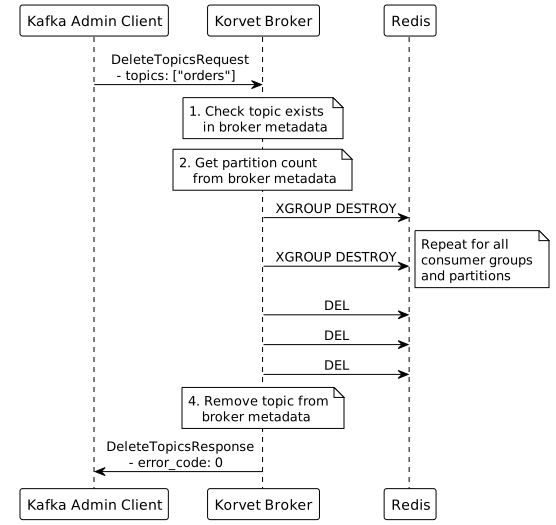
Kafka Wire Protocol
DeleteTopicsRequest {
  topic_names: ["orders", "payments"]
  timeout_ms: 30000
}
DeleteTopicsResponse {
throttle_time_ms: 0
topics: [
{
name: "orders"
error_code: 0 // NONE
error_message: null
},
{
name: "payments"
error_code: 3 // UNKNOWN_TOPIC_OR_PARTITION
error_message: "Topic 'payments' does not exist"
}
]
}
Metadata Request (List Topics)
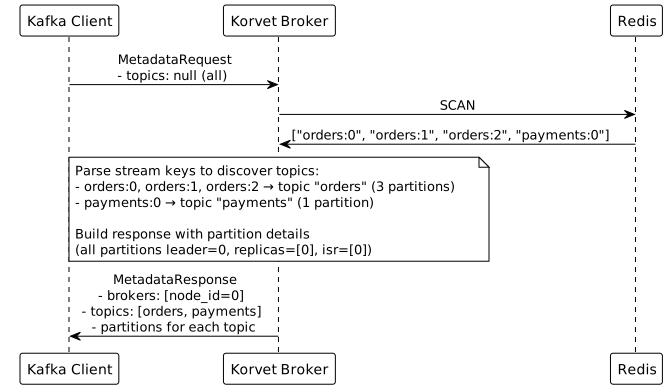
Kafka Wire Protocol
MetadataRequest {
  topics: null                 // null = all topics, or specific topic list
  allow_auto_topic_creation: false
  include_cluster_authorized_operations: false
  include_topic_authorized_operations: false
}
MetadataResponse {
throttle_time_ms: 0
brokers: [
{
node_id: 0
host: "localhost"
port: 9092
rack: null
}
]
cluster_id: "korvet-cluster-1"
controller_id: 0
topics: [
{
error_code: 0
name: "orders"
is_internal: false
partitions: [
{
error_code: 0
partition: 0
leader: 0 // broker node_id
replica_nodes: [0]
isr_nodes: [0] // in-sync replicas
offline_replicas: []
},
{
error_code: 0
partition: 1
leader: 0
replica_nodes: [0]
isr_nodes: [0]
offline_replicas: []
},
{
error_code: 0
partition: 2
leader: 0
replica_nodes: [0]
isr_nodes: [0]
offline_replicas: []
}
]
},
{
error_code: 0
name: "payments"
is_internal: false
partitions: [
{
error_code: 0
partition: 0
leader: 0
replica_nodes: [0]
isr_nodes: [0]
offline_replicas: []
}
]
}
]
}
Redis Commands Detail
# Metadata requests are served from broker state backed by the topic registry.
# The request path does not scan Redis stream keys to discover topics.
Implementation Notes
-
All Topics vs Specific Topics:
-
If
topics=null: Return metadata for all topics from broker registry -
If
topics=[…]: Return metadata only for specified topics -
Non-existent topics: Include in response with
UNKNOWN_TOPIC_OR_PARTITIONerror
-
-
Broker Information:
-
Single-node setup: Always return one broker (node_id=0, this server)
-
Clustered setup: Return all Korvet broker nodes
-
-
Partition Leadership:
-
Single-broker mode: one broker leads every partition
-
Multi-broker mode: metadata includes all known brokers and currently uses the first broker as leader for each partition
-
-
Controller:
controller_idis the local broker ID in the current handler implementation -
Auto Topic Creation: Metadata resolution flows through the topic registry, so runtime auto-create configuration affects missing-topic behavior in addition to the request flag

