Consumer Group Workflow
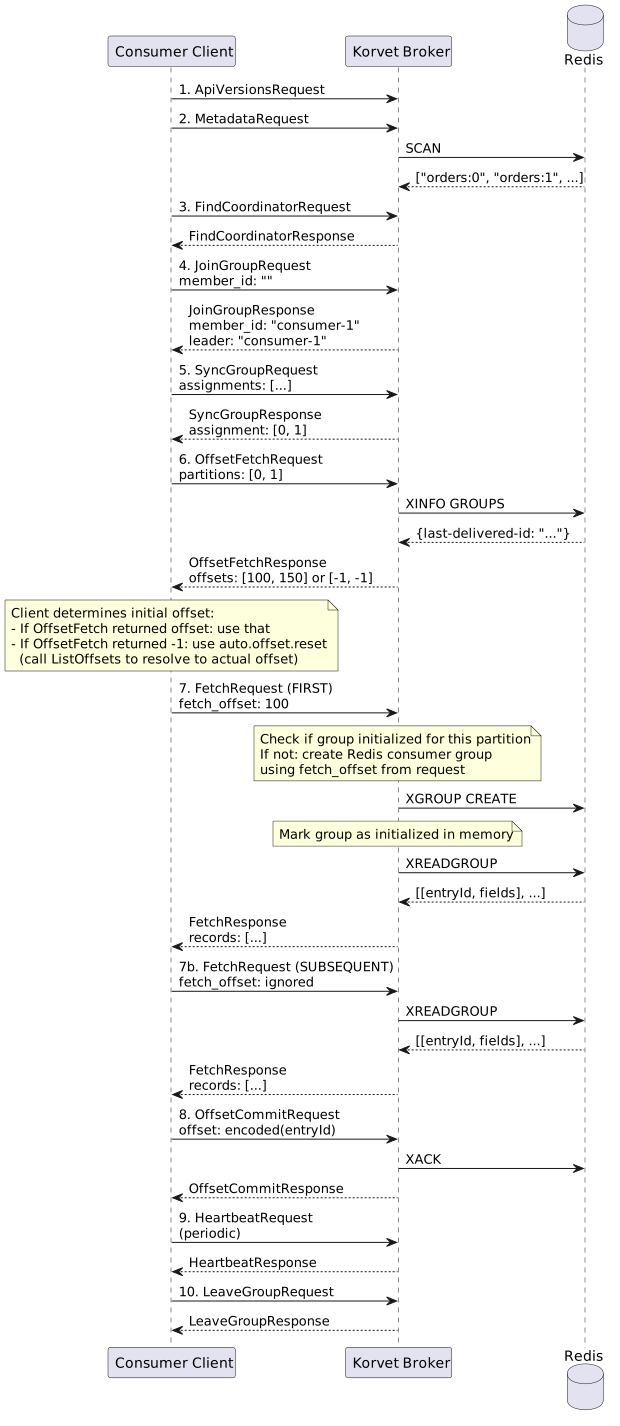
This page describes the complete Kafka API interaction sequence for a consumer that is part of a consumer group.
| This workflow is intended for advanced readers debugging consumer-group behavior. For day-to-day client usage, prefer Consuming Messages. |
Overview
A consumer group workflow involves additional coordination APIs compared to standalone consumers:
-
ApiVersions - Negotiate protocol version with broker
-
Metadata - Discover topics and partitions
-
FindCoordinator - Locate the group coordinator
-
JoinGroup - Join the consumer group and participate in rebalancing
-
SyncGroup - Receive partition assignment from coordinator
-
OffsetFetch - Retrieve committed offsets for the group
-
ListOffsets (optional) - Resolve "earliest" or "latest" to actual offset if no committed offset exists
-
Fetch - Read messages from assigned partitions
-
First Fetch: Creates Redis consumer groups with a start ID derived from
fetch_offset -
Subsequent Fetches: Use XREADGROUP with
>(messages never delivered to this group)
-
-
OffsetCommit - Commit consumed offsets to the group (periodic)
-
Heartbeat - Maintain group membership (periodic)
-
LeaveGroup - Gracefully leave the group on shutdown
API Sequence
1-2. ApiVersions and Metadata
Same as standalone consumer. See Consumer Workflow.
3. FindCoordinator Request
The client locates the coordinator for the consumer group.
FindCoordinatorRequest {
  key: "my-consumer-group"
  key_type: 0  // GROUP
}
FindCoordinatorResponse {
throttle_time_ms: 0
error_code: 0
error_message: null
node_id: 0
host: "localhost"
port: 9092
}4. JoinGroup Request
The client joins the consumer group. The first member becomes the leader and receives all member metadata.
JoinGroupRequest {
  group_id: "my-consumer-group"
  session_timeout_ms: 45000
  rebalance_timeout_ms: 300000
  member_id: ""  // empty for first join
  group_instance_id: null
  protocol_type: "consumer"
  protocols: [
    {
      name: "range"  // partition assignment strategy
      metadata: {
        topics: ["orders"]
        user_data: null
      }
    }
  ]
}
JoinGroupResponse {
throttle_time_ms: 0
error_code: 0
generation_id: 1
protocol_name: "range"
leader: "consumer-1-abc123"
member_id: "consumer-1-abc123"
members: [
{
member_id: "consumer-1-abc123"
group_instance_id: null
metadata: {topics: ["orders"]}
},
{
member_id: "consumer-2-def456"
group_instance_id: null
metadata: {topics: ["orders"]}
}
]
}5. SyncGroup Request
The leader computes partition assignments and sends them via SyncGroup. Followers send empty assignments.
SyncGroupRequest {
  group_id: "my-consumer-group"
  generation_id: 1
  member_id: "consumer-1-abc123"
  group_instance_id: null
  assignments: [
    {
      member_id: "consumer-1-abc123"
      assignment: {
        topics: [
          {topic: "orders", partitions: [0, 1]}
        ]
      }
    },
    {
      member_id: "consumer-2-def456"
      assignment: {
        topics: [
          {topic: "orders", partitions: [2]}
        ]
      }
    }
  ]
}
SyncGroupResponse {
throttle_time_ms: 0
error_code: 0
assignment: {
topics: [
{topic: "orders", partitions: [0, 1]}
]
}
}6. OffsetFetch Request
The consumer retrieves committed offsets to determine where to start reading. This happens before the first fetch.
OffsetFetchRequest {
  group_id: "my-consumer-group"
  topics: [
    {
      name: "orders"
      partition_indexes: [0, 1]
    }
  ]
}
OffsetFetchResponse {
throttle_time_ms: 0
topics: [
{
name: "orders"
partitions: [
{
partition_index: 0
committed_offset: -1 // No committed offset
metadata: ""
error_code: 0
},
{
partition_index: 1
committed_offset: -1 // No committed offset
metadata: ""
error_code: 0
}
]
}
]
}OffsetFetchResponse {
throttle_time_ms: 0
topics: [
{
name: "orders"
partitions: [
{
partition_index: 0
committed_offset: 100
metadata: ""
error_code: 0
},
{
partition_index: 1
committed_offset: 150
metadata: ""
error_code: 0
}
]
}
]
}Redis Commands
# 1. Read the explicit committed offset from the committed-offset store (primary source)
HMGET korvet:broker:commit:my-consumer-group orders:0 orders:1
# Canonical values remain bare offsets, e.g. "44", for rolling-upgrade compatibility.

# Admin views also read matching offset/timestamp metadata.
HMGET korvet:broker:commit-timestamps:{<slot-tag>}:my-consumer-group orders:0 orders:1
# Metadata values contain both values, e.g. "44|1752775672000".

# 2. Fallback only when no committed offset is stored:
#    query Redis Streams consumer group metadata
XINFO GROUPS korvet:storage:local:orders:0
# Returns group info including last-delivered-id for "my-consumer-group"

# Encode last-delivered-id to Kafka offset (stateless)
# For entry ID "1234567890123-5" with sequenceBits=14:
#   offset = (1234567890123 << 14) | 5

# If neither source has data: return -1| Redis consumer groups are not created during OffsetFetch. They are created lazily on the first Fetch request (see next section). |
7. Fetch Request
Consumer groups use XREADGROUP with > to read messages that haven’t been delivered to any consumer in the group.
On the first Fetch request, the broker creates the Redis consumer group if it doesn’t exist yet.
FetchRequest {
  topics: [
    {
      name: "orders"
      partitions: [
        {
          partition: 0
          fetch_offset: 42  // Used ONLY for first fetch to initialize group
          partition_max_bytes: 1048576
        }
      ]
    }
  ]
  max_wait_ms: 500
  min_bytes: 1
}
Redis Commands - First Fetch (Group Initialization)
On the first Fetch request for a consumer group partition, the broker:
-
Checks if the Redis consumer group exists for this partition
-
If it doesn’t exist, creates it using the
fetch_offsetfrom the FetchRequest -
Marks the group as initialized in broker memory
# The client determines the initial offset based on:
# - OffsetFetch result (if group has committed offsets)
# - auto.offset.reset config (if OffsetFetch returned -1)
# - ListOffsets API (to resolve "earliest" or "latest" to actual offset)

# The client sends this offset in the first FetchRequest

# Example 1: Client wants to start from latest (fetch_offset = 999999999)
# Broker decodes offset to entry ID and creates group
XGROUP CREATE

# Example 2: Client wants to start from earliest (fetch_offset = 0)
XGROUP CREATE

# Example 3: Client wants to resume from committed offset (fetch_offset = 1234567890123)
XGROUP CREATE

# If group already exists (e.g., after broker restart), preserve existing position
# (XGROUP CREATE fails with BUSYGROUP error, which is caught and ignored)
Redis Commands - Subsequent Fetches
After the group is initialized, all subsequent Fetch requests use XREADGROUP with >:
# Consumer groups ALWAYS use > (messages never delivered to this group)
# The fetch_offset in FetchRequest is IGNORED after initialization
# Redis tracks the group's position via last-delivered-id
XREADGROUP GROUP my-consumer-group consumer-1-abc123 COUNT 100 STREAMS korvet:storage:local:orders:0 >
XREADGROUP GROUP my-consumer-group consumer-1-abc123 COUNT 100 STREAMS korvet:storage:local:orders:1 >

# Subsequent reads continue from where the group left off
Broker State Management
The broker maintains in-memory state to track which consumer groups have been initialized:
// In DeliveryTracker
// InitKey is a record: (GroupId groupId, String topic, int partition)
Set<InitKey> initializedGroups;

// On first Fetch:
if (!deliveryTracker.isInitialized(groupId, topic, partition)) {
    // Create Redis consumer group using fetch_offset from FetchRequest
    createRedisConsumerGroup(groupId, topic, partition, fetchOffset);
    deliveryTracker.markInitialized(groupId, topic, partition);
}
This state is lost on broker restart, but that’s acceptable because:
-
The broker attempts
XGROUP CREATEon the first fetch after restart -
If the group already exists in Redis,
XGROUP CREATEfails withBUSYGROUPerror -
The broker catches this error and preserves the existing group position
-
The group’s position is preserved in Redis
See Consumer: Fetch Messages for details.
8. OffsetCommit Request
The consumer periodically commits consumed offsets to the group.
OffsetCommitRequest {
  group_id: "my-consumer-group"
  generation_id: 1
  member_id: "consumer-1-abc123"
  topics: [
    {
      name: "orders"
      partitions: [
        {
          partition_index: 0
          committed_offset: 100
          committed_metadata: ""
        },
        {
          partition_index: 1
          committed_offset: 150
          committed_metadata: ""
        }
      ]
    }
  ]
}
OffsetCommitResponse {
throttle_time_ms: 0
topics: [
{
name: "orders"
partitions: [
{partition_index: 0, error_code: 0},
{partition_index: 1, error_code: 0}
]
}
]
}Redis Commands
# Decode Kafka offsets to Redis Stream entry IDs (stateless)
# For offset 100 with sequenceBits=10:
#   timestamp = 100 >> 10
#   sequence = 100 & 1023
#   entry_id = "{timestamp}-{sequence}"

# Acknowledge messages in Redis consumer group
XACK korvet:storage:local:orders:0 my-consumer-group <entry-id>
XACK korvet:storage:local:orders:1 my-consumer-group <entry-id>

# Persist committed Kafka offsets separately after successful acknowledgment
9. Heartbeat Request
The consumer sends periodic heartbeats to maintain group membership.
HeartbeatRequest {
  group_id: "my-consumer-group"
  generation_id: 1
  member_id: "consumer-1-abc123"
  group_instance_id: null
}
HeartbeatResponse {
throttle_time_ms: 0
error_code: 0 // NONE - membership is valid
}10. LeaveGroup Request
The consumer gracefully leaves the group on shutdown.
LeaveGroupRequest {
  group_id: "my-consumer-group"
  members: [
    {
      member_id: "consumer-1-abc123"
      group_instance_id: null
    }
  ]
}
LeaveGroupResponse {
throttle_time_ms: 0
error_code: 0
members: [
{
member_id: "consumer-1-abc123"
group_instance_id: null
error_code: 0
}
]
}
Initial Offset Positioning
The initial offset for a consumer group is determined by the following sequence:
-
OffsetFetchRequest (step 6): Consumer queries for committed offsets
-
If group has committed offsets → use those offsets
-
If no committed offsets → returns -1
-
-
Client determines initial offset (client-side logic):
-
If OffsetFetch returned specific offset → use that offset
-
If OffsetFetch returned -1 → use
auto.offset.resetconfig:-
auto.offset.reset=earliest→ call ListOffsets with timestamp=-2 (beginning) -
auto.offset.reset=latest→ call ListOffsets with timestamp=-1 (end)
-
-
-
First FetchRequest (step 7): Client sends the offset it wants to start from
-
The
fetch_offsetfield contains the initial offset determined in step 2 -
Broker creates Redis consumer group with this offset (lazy initialization)
-
-
XGROUP CREATE (during first Fetch): Broker creates Redis consumer group
-
Decode
fetch_offsetto Redis Stream entry ID -
XGROUP CREATEwith decoded entry ID -
Mark group as initialized in broker memory
-
-
Subsequent XREADGROUP (during later Fetches): Always use
>to read undelivered messages-
XREADGROUP GROUP group consumer COUNT n STREAMS stream > -
Redis tracks position internally via
last-delivered-id -
The
fetch_offsetin FetchRequest is ignored after initialization
-
# Step 1: OffsetFetchRequest → returns -1 (no committed offset)

# Step 2: Client calls ListOffsets with timestamp=-1 → returns offset 999999999

# Step 3: First FetchRequest with fetch_offset=999999999
# Broker decodes to entry ID "976562-511" and creates group
XGROUP CREATE
XGROUP CREATE

# Step 4: Subsequent FetchRequests always use >
XREADGROUP
XREADGROUP# Step 1: OffsetFetchRequest → returns offset 1234567890123
# Step 2: Client uses committed offset (no ListOffsets needed)
# Step 3: First FetchRequest with fetch_offset=1234567890123
# Broker decodes to entry ID "1205632-123" and creates group
XGROUP CREATE
# Step 4: Subsequent FetchRequests always use >
XREADGROUPKey Differences from Standalone Consumer
-
Group coordination: Requires FindCoordinator, JoinGroup, SyncGroup, Heartbeat, LeaveGroup
-
Automatic partition assignment: Partitions are assigned by the group coordinator
-
Offset commits: Offsets are committed to the group (not tracked locally)
-
Rebalancing: When members join/leave, partitions are reassigned
-
Member ID: Consumer receives a member ID and must include it in requests
-
Generation ID: Each rebalance increments the generation ID
-
Offset positioning:
-
Client determines initial offset (via OffsetFetch + ListOffsets)
-
Client sends initial offset in first FetchRequest
-
Broker creates Redis consumer group lazily on first Fetch
-
Subsequent Fetches always use XREADGROUP with
>
-
-
Broker state: Broker tracks which consumer groups have been initialized in memory

