Consumer: Fetch Committed Offsets
This page describes how Korvet handles Kafka OffsetFetchRequest operations.
| This page is implementation-oriented and focuses on Kafka-to-Redis mapping details. |
Consumer Fetches Committed Offset
Kafka Wire Protocol
OffsetFetchRequest {
  group_id: "my-group"
  topics: [
    {
      name: "orders"
      partitions: [0, 1, 2]
    },
    {
      name: "payments"
      partitions: [0]
    }
  ]
  require_stable: false
}
OffsetFetchResponse {
throttle_time_ms: 0
topics: [
{
name: "orders"
partitions: [
{
partition: 0
committed_offset: 44
committed_leader_epoch: -1
metadata: "" // metadata is never persisted, so always empty
error_code: 0
},
{
partition: 1
committed_offset: 20
committed_leader_epoch: -1
metadata: ""
error_code: 0
},
{
partition: 2
committed_offset: -1 // no offset committed
committed_leader_epoch: -1
metadata: ""
error_code: 0
}
]
},
{
name: "payments"
partitions: [
{
partition: 0
committed_offset: 100
committed_leader_epoch: -1
metadata: ""
error_code: 0
}
]
}
]
error_code: 0
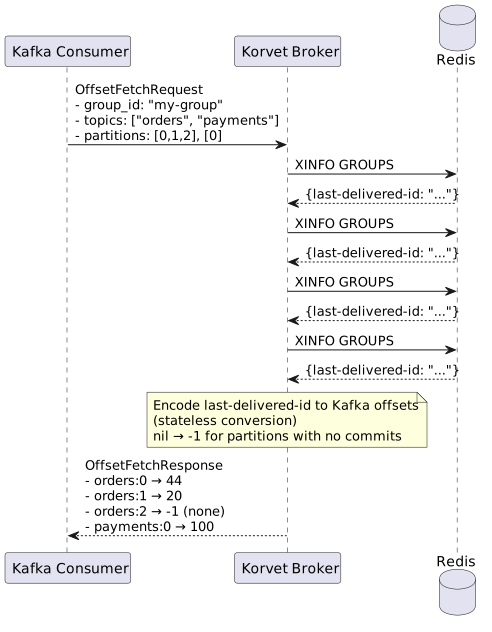
}
Redis Commands Detail
OffsetFetch resolves offsets in two stages:
-
read explicit committed offsets from the committed-offset store
-
if a partition has no stored offset, fall back to storage-layer group metadata such as
XINFO GROUPS
Implementation Notes
-
No Offset Committed: Return offset
-1when partition has no committed offset -
Metadata: Commit metadata is not persisted, so the returned
metadatafield is always empty -
Primary Source: Explicit commits are stored separately from Redis consumer-group state, so
OffsetFetchdoes not rely only on pending-entry metadata. -
Fallback Behavior: When no committed offset is stored, the broker may derive an offset from the group’s
last-delivered-id. -
Missing Group State: If neither source has data, the response uses offset
-1. -
Version Handling: Version 8+ requests use the flexible groups-based response shape; older versions use the topics-based response format.

