Consumer: Fetch Messages
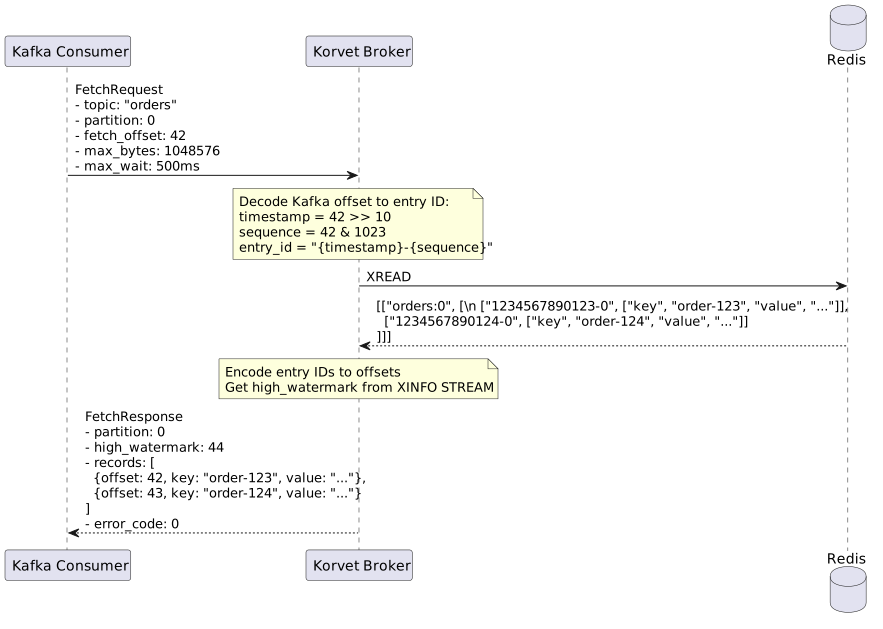
This page describes how Korvet handles Kafka FetchRequest operations.
| This page is implementation-oriented and focuses on Kafka-to-Redis mapping details. |
Consumer Fetches Messages
Kafka Wire Protocol
FetchRequest {
  replica_id: -1             // -1 for consumer (not replica)
  max_wait_ms: 500           // max time to wait if min_bytes not met
  min_bytes: 1               // min bytes to accumulate before responding
  max_bytes: 52428800        // max bytes for entire response (50MB)
  isolation_level: 0         // 0=read_uncommitted, 1=read_committed
  session_id: 0
  session_epoch: -1
  topics: [
    {
      name: "orders"
      partitions: [
        {
          partition: 0
          fetch_offset: 42        // start reading from offset 42
          log_start_offset: 0
          partition_max_bytes: 1048576  // max 1MB per partition
        }
      ]
    }
  ]
  forgotten_topics: []
}
FetchResponse {
throttle_time_ms: 0
error_code: 0
session_id: 0
topics: [
{
name: "orders"
partitions: [
{
partition: 0
error_code: 0 // NONE
high_watermark: 44 // next offset to be written
last_stable_offset: 44
log_start_offset: 0
aborted_transactions: []
preferred_read_replica: -1
records: [
{
offset: 42
timestamp: 1234567890000
key: "order-123"
value: {"product": "widget", "quantity": 5}
headers: [
{key: "source", value: "web"},
{key: "version", value: "1.0"}
]
},
{
offset: 43
timestamp: 1234567891000
key: "order-124"
value: {"product": "gadget", "quantity": 3}
headers: []
}
]
}
]
}
]
}
Redis Commands Detail
Standalone fetches convert fetch_offset to an exclusive Redis start ID and read with XREAD.
Consumer-group fetches resolve the member and group from broker-side registry state, lazily create Redis consumer groups for first fetches, then read with XREADGROUP … >.
Partition Metadata Fields
Each partition in the FetchResponse includes critical metadata that consumers use for offset management and monitoring:
high_watermark
The high watermark (HWM) is the offset of the next message that will be written to the partition. In other words, it’s one greater than the offset of the last message in the partition.
# Get stream info including first and last entry IDs
XINFO STREAM korvet:storage:local:orders:0
# Returns stream metadata including:
#   "last-entry" -> ["1234567890123-5", [...]]

# Convert last entry ID to Kafka offset and add 1
# If last entry ID is "1234567890123-5":
#   last_offset = (1234567890123 << 10) | 5 = 1264197008485893
# high_watermark = 1264197008485893 + 1 = 1264197008485894-
Consumers use HWM to determine if they’ve reached the end of the partition
-
Lag calculation:
lag = high_watermark - consumer_position -
The
endOffsets()API returns the high watermark for each partition
log_start_offset
The log start offset is the offset of the first available message in the partition. This may be greater than 0 if messages have been deleted due to retention policies or manual trimming.
# Get stream info including first and last entry IDs
XINFO STREAM korvet:storage:local:orders:0
# Returns stream metadata including:
#   "first-entry" -> ["1234567890100-0", [...]]

# Convert first entry ID to Kafka offset
# If first entry ID is "1234567890100-0":
# log_start_offset = (1234567890100 << 10) | 0 = 1264197008486400-
Consumers seeking to "earliest" will start from this offset
-
If a consumer requests an offset below
log_start_offset, Korvet returnsOFFSET_OUT_OF_RANGEerror -
Monitoring tools use this to detect message deletion/trimming
Implementation Notes
-
Empty Response: If no messages available and
max_wait_ms > 0, wait up to max_wait_ms for new messages -
Offset Decoding: Stateless conversion from Kafka offset to Stream entry ID using bit operations
-
Unknown Topics: Unknown topics are filtered before read execution and returned as
UNKNOWN_TOPIC_OR_PARTITION. -
High Watermark / Log Start: The broker derives
high_watermarkandlog_start_offsetfrom stream metadata after the read. -
Group Initialization: First group fetches create Redis groups using a start ID derived from
fetch_offset, not a fixed0or$position. -
Delivered Message Tracking: Group fetches track delivered Redis message IDs in broker memory so later offset commits can acknowledge them.
-
Performance: Reads and metadata lookups are batched, and blocking group fetches may be sliced into shorter polling windows.
FetchRequest {
  topics: [
    {
      name: "orders"
      partitions: [
        { index: 0, fetchOffset: 5, maxBytes: 1048576 }
      ]
    }
  ]
  maxWaitMs: 500
  minBytes: 1
}XREAD COUNT <n> STREAMS korvet:storage:local:orders:0 <exclusive-start-id>
XGROUP CREATE korvet:storage:local:orders:0 my-group <start-id> MKSTREAM
XREADGROUP GROUP my-group consumer-1 COUNT <n> STREAMS korvet:storage:local:orders:0 >-
Redis returns entries with IDs and the record’s
value/key/headers/timestampfields -
Reassemble each entry’s fields into Kafka record format (key, value, headers, timestamp)
-
Encode each entry ID to Kafka offset:
offset = (timestamp << sequenceBits) | sequence -
Build FetchResponse with records, partition metadata, and high watermark

