|
This version is still in development and is not considered stable yet. For the latest stable version, please use Korvet 0.20! |
Producer Workflow
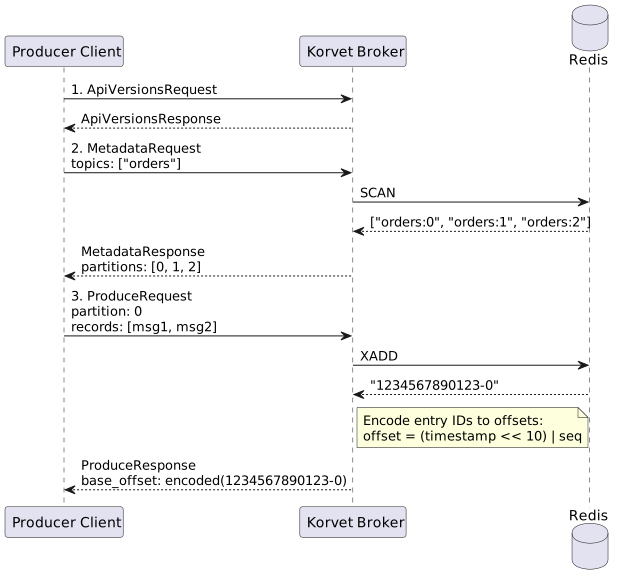
This page describes the complete Kafka API interaction sequence for a producer application.
| This workflow is intended for readers who need to understand broker behavior end to end. For task-oriented user guidance, prefer Producing Messages. |
Overview
A typical producer workflow involves the following API calls:
-
ApiVersions - Negotiate protocol version with broker
-
Metadata - Discover topics and partitions
-
CreateTopics (optional) - Create topic if it doesn’t exist
-
Produce - Send messages to topic partitions
API Sequence
1. ApiVersions Request
The client first negotiates the protocol version.
ApiVersionsRequest (API Key: 18)
ApiVersionsRequest {
  client_software_name: "apache-kafka-java"
  client_software_version: "3.9.1"
}
ApiVersionsResponse
ApiVersionsResponse {
  error_code: 0
  api_keys: [
    { api_key: 0, min_version: 0, max_version: 9 },    // Produce
    { api_key: 1, min_version: 0, max_version: 13 },   // Fetch
    { api_key: 2, min_version: 0, max_version: 7 },    // ListOffsets
    { api_key: 3, min_version: 0, max_version: 12 },   // Metadata
    { api_key: 18, min_version: 0, max_version: 3 },   // ApiVersions
    { api_key: 19, min_version: 0, max_version: 7 },   // CreateTopics
    ...
  ]
}2. Metadata Request
The client discovers available topics and their partitions.
MetadataRequest (API Key: 3)
MetadataRequest {
  topics: ["orders"]  // or null for all topics
  allow_auto_topic_creation: false
}
MetadataResponse
MetadataResponse {
  throttle_time_ms: 0
  brokers: [
    { node_id: 0, host: "localhost", port: 9092 }
  ]
  cluster_id: "korvet-cluster"
  controller_id: 0
  topics: [
    {
      error_code: 0
      name: "orders"
      is_internal: false
      partitions: [
        {
          error_code: 0
          partition_index: 0
          leader_id: 0
          replica_nodes: [0]
          isr_nodes: [0]
        },
        {
          error_code: 0
          partition_index: 1
          leader_id: 0
          replica_nodes: [0]
          isr_nodes: [0]
        }
      ]
    }
  ]
}3. CreateTopics Request (Optional)
If the topic doesn’t exist, the client may create it.
CreateTopicsRequest (API Key: 19)
CreateTopicsRequest {
  topics: [
    {
      name: "orders"
      num_partitions: 3
      replication_factor: 1
      configs: [
        { name: "retention.ms", value: "604800000" }  // 7 days
      ]
    }
  ]
  timeout_ms: 30000
  validate_only: false
}
CreateTopicsResponse
CreateTopicsResponse {
  throttle_time_ms: 0
  topics: [
    {
      name: "orders"
      error_code: 0
      error_message: null
      num_partitions: 3
      replication_factor: 1
      configs: [
        { name: "retention.ms", value: "604800000" }
      ]
    }
  ]
}
Redis Commands
# Topic creation is primarily a broker-side operation
# Topic metadata stored in a single RedisJSON document at {keyspace}:topics

# Redis Streams for partitions are created lazily on first XADD:
# - korvet:storage:local:orders:0 (created when first message produced to partition 0)
# - korvet:storage:local:orders:1 (created when first message produced to partition 1)
# - korvet:storage:local:orders:2 (created when first message produced to partition 2)
4. Produce Request
The client sends messages to topic partitions.
See Producer: Send Messages for detailed ProduceRequest mapping.